Skip to content

FXI Tutorials

Field guides, prompt recipes and studio walkthroughs for directing AI video and image models, from your first frame to a finished cut.

Which FXI Studio tutorials should you start with?

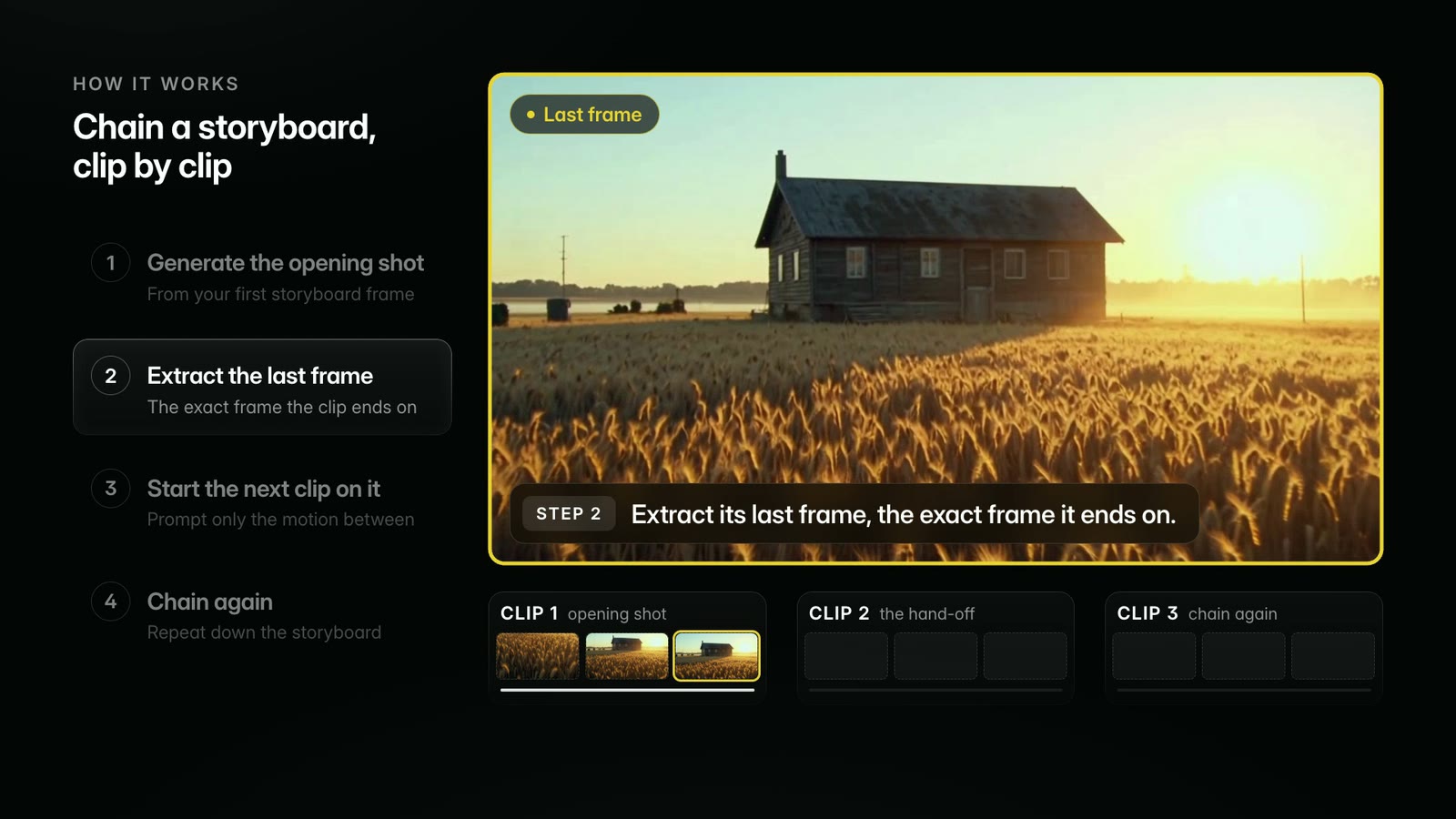
FXI Studio field guides are long-form tutorials from the cutting room: shot grammar, prompt structures and real clips rendered inside FXI Studio. Frame chaining and consistent characters are the two techniques every multi-shot AI film needs, so most directors start there.

Short answers

Prompt Recipes

Get the perfect shot with ready-to-use camera moves. Copy a recipe, drop it into any shot.

Camera· 43 recipes

  • Whip pan right start frame

    whip pan right. Movement: rotate rapidly from the starting direction toward a new target on the right. Speed: fast snap with brief motion blur during the rotation. Framing: begin on one readable composition and land on a second readable target. End: settle into a sharp final frame.

    Recreate Whip pan right in the generator
  • Whip pan left start frame

    whip pan left. Movement: rotate rapidly from the starting direction toward a new target on the left. Speed: fast snap with brief motion blur during the rotation. Framing: begin on one readable composition and land on a second readable target. End: settle into a sharp final frame.

    Recreate Whip pan left in the generator
  • Fast zoom in start frame

    Fast zoom in

    Zoom/Lens

    fast zoom in. Movement: quickly increase lens focal length toward the main visual target. Speed: quick decisive zoom. Framing: keep the target centered or clearly readable during the scale change. End: finish on a stable tighter composition.

    Recreate Fast zoom in in the generator
  • Fast zoom out start frame

    Fast zoom out

    Zoom/Lens

    fast zoom out. Movement: quickly decrease lens focal length away from the main visual target. Speed: quick decisive zoom. Framing: keep the target readable as the surrounding space appears. End: finish on a stable wider composition.

    Recreate Fast zoom out in the generator
  • Crash zoom in start frame

    Crash zoom in

    Zoom/Lens

    crash zoom in. Movement: snap the lens rapidly toward the main visual target. Speed: very fast and punchy. Framing: keep the target readable through the sudden scale change. End: land on a bold tighter composition.

    Recreate Crash zoom in in the generator
  • Crash zoom out start frame

    crash zoom out. Movement: snap the lens rapidly away from the main visual target. Speed: very fast and punchy. Framing: keep the target readable as the surrounding space appears. End: land on a bold wider composition.

    Recreate Crash zoom out in the generator
  • Dolly in start frame

    Dolly in

    Dolly/Track

    dolly in. Movement: move the camera physically forward in a straight line toward the main subject. Speed: smooth controlled push. Framing: keep camera height, lens direction and subject position consistent while distance closes. End: finish in a tighter composition.

    Recreate Dolly in in the generator
  • Follow shot / over-the-shoulder start frame

    follow shot from behind. Movement: move behind the subject along their route at shoulder height. Speed: match the subject pace. Framing: keep the back, shoulder or head as the foreground guide while the route ahead stays readable. End: continue following with the subject leading the frame.

    Recreate Follow shot / over-the-shoulder in the generator
  • Reverse tracking / walk-and-talk start frame

    reverse tracking shot. Movement: move backward in front of the walking subject. Speed: match the subject forward pace. Framing: keep front-facing face and body framing stable as the background moves behind them. End: hold a clear front-facing moving composition.

    Recreate Reverse tracking / walk-and-talk in the generator
  • Low tracking start frame

    Low tracking

    Dolly/Track

    low tracking shot. Movement: move at ground or below-waist height alongside the subject movement path. Speed: match the subject, footsteps or wheels. Framing: keep the low detail readable while the ground plane moves through frame. End: finish with the low perspective clearly maintained.

    Recreate Low tracking in the generator
  • Arc left start frame

    Arc left

    Physical Moves

    arc left. Movement: move on a shallow curved path around the main subject toward the left side. Speed: smooth measured curve. Framing: keep distance, height and subject readability consistent while the angle changes. End: finish from a new left-side angle.

    Recreate Arc left in the generator
  • Arc right start frame

    Arc right

    Physical Moves

    arc right. Movement: move on a shallow curved path around the main subject toward the right side. Speed: smooth measured curve. Framing: keep distance, height and subject readability consistent while the angle changes. End: finish from a new right-side angle.

    Recreate Arc right in the generator
  • Orbit clockwise start frame

    Orbit clockwise

    Physical Moves

    clockwise orbit. Movement: circle clockwise around the main subject at a consistent radius. Speed: smooth controlled orbit. Framing: keep the subject centered while the background rotates around them. End: complete the intended arc or full circle with stable framing.

    Recreate Orbit clockwise in the generator
  • Orbit counterclockwise start frame

    counterclockwise orbit. Movement: circle counterclockwise around the main subject at a consistent radius. Speed: smooth controlled orbit. Framing: keep the subject centered while the background rotates around them. End: complete the intended arc or full circle with stable framing.

    Recreate Orbit counterclockwise in the generator
  • Push past / pass-by shot start frame

    push past. Movement: move forward past a visible foreground object, edge or opening. Speed: smooth forward glide. Framing: let the foreground pass close to the lens while the space beyond becomes clearer. End: arrive inside or beyond the foreground layer.

    Recreate Push past / pass-by shot in the generator
  • Pass-through objects start frame

    Pass-through objects

    Physical Moves

    pass-through movement. Movement: move forward toward a visible object, surface or barrier and continue into the space beyond. Speed: smooth centered glide. Framing: keep the opening or surface centered as the transition point. End: arrive inside the revealed space beyond.

    Recreate Pass-through objects in the generator
  • Chase shot start frame

    Chase shot

    Human Camera

    chase shot. Movement: follow a moving subject quickly along the action route. Speed: fast, reactive and physically close. Framing: keep the subject visible while allowing energetic reframing. End: stay connected to the subject in motion.

    Recreate Chase shot in the generator
  • Body-mounted camera / Snorricam start frame

    body-mounted Snorricam. Movement: keep the camera fixed relative to the subject torso or face while the subject moves. Speed: match the subject body motion. Framing: keep the subject close, centered and facing the camera as the background moves around them. End: finish with the subject still locked in frame.

    Recreate Body-mounted camera / Snorricam in the generator
  • Crane up start frame

    Crane up

    Drone/Crane

    crane up. Movement: travel smoothly upward through open space. Speed: slow controlled vertical lift. Framing: keep the subject or location readable as the camera rises. End: finish with the higher scale clearly visible.

    Recreate Crane up in the generator
  • Crane down start frame

    Crane down

    Drone/Crane

    crane down. Movement: travel smoothly downward through open space. Speed: slow controlled vertical descent. Framing: keep the subject or location readable as the camera descends. End: finish with the lower subject or destination clearly visible.

    Recreate Crane down in the generator
  • Drone push in start frame

    Drone push in

    Drone/Crane

    drone push in. Movement: fly smoothly forward through open space toward the subject or destination. Speed: controlled aerial glide. Framing: keep the route and destination readable as the camera approaches. End: arrive at a closer aerial composition.

    Recreate Drone push in in the generator
  • Drone pull back start frame

    Drone pull back

    Drone/Crane

    drone pull back. Movement: fly smoothly backward away from the subject or destination. Speed: controlled aerial retreat. Framing: keep the subject readable as more landscape appears. End: finish on a wider aerial composition.

    Recreate Drone pull back in the generator
  • Helicopter shot start frame

    Helicopter shot

    Drone/Crane

    helicopter-style aerial shot. Movement: move from high altitude along a broad gradual flight path. Speed: steady controlled aerial motion. Framing: keep the landscape or distant moving subject readable at wide scale. End: finish on a stable high-altitude composition.

    Recreate Helicopter shot in the generator
  • First-person view start frame

    first-person view. Movement: move forward at human eye height from the character perspective. Speed: natural walking or reaching pace. Framing: use visible hands, arms or body edges as the viewer physical reference. End: arrive at the next point of action from the same point of view.

    Recreate First-person view in the generator
  • Infinite zoom start frame

    infinite zoom. Movement: zoom continuously inward toward the exact center target. Speed: smooth accelerating zoom. Framing: keep the circular target centered as it expands. End: finish when the next visual world fills the frame.

    Recreate Infinite zoom in the generator
  • Earth zoom out start frame

    earth zoom out. Movement: pull upward from the starting point through street, city, landscape and planet scale. Speed: rapid expanding zoom out. Framing: keep the original location centered as scale grows. End: finish on a planet-scale view with the starting point still implied at center.

    Recreate Earth zoom out in the generator
  • Static shot start frame

    Static shot

    Pan/Tilt

    locked-off static shot. Movement: hold one fixed camera position for the full clip. Speed: still and steady. Framing: keep the same angle, height, lens distance and composition. End: finish with the same framing and camera position.

    Recreate Static shot in the generator
  • Pan right start frame

    Pan right

    Pan/Tilt

    pan right. Movement: rotate the camera horizontally from left to right from one fixed point. Speed: smooth constant rotation. Framing: keep the horizon level while new space enters from the right side of the frame. End: settle on a clear final composition.

    Recreate Pan right in the generator
  • Pan left start frame

    Pan left

    Pan/Tilt

    pan left. Movement: rotate the camera horizontally from right to left from one fixed point. Speed: smooth constant rotation. Framing: keep the horizon level while new space enters from the left side of the frame. End: settle on a clear final composition.

    Recreate Pan left in the generator
  • Tilt up start frame

    Tilt up

    Pan/Tilt

    tilt up. Movement: rotate the camera upward from one fixed point. Speed: smooth constant tilt. Framing: keep the vertical subject or architecture centered as the frame travels upward. End: land on the upper target.

    Recreate Tilt up in the generator
  • Tilt down start frame

    Tilt down

    Pan/Tilt

    tilt down. Movement: rotate the camera downward from one fixed point. Speed: smooth constant tilt. Framing: keep the vertical subject or architecture centered as the frame travels downward. End: land on the lower target.

    Recreate Tilt down in the generator
  • Slow zoom in start frame

    Slow zoom in

    Zoom/Lens

    slow zoom in. Movement: slowly increase lens focal length toward a tighter frame. Speed: gradual and even. Framing: keep the main visual target readable as it becomes larger in frame. End: finish on a stable tighter composition.

    Recreate Slow zoom in in the generator
  • Slow zoom out start frame

    Slow zoom out

    Zoom/Lens

    slow zoom out. Movement: slowly decrease lens focal length toward a wider frame. Speed: gradual and even. Framing: keep the main visual target readable as more surrounding space appears. End: finish on a stable wider composition.

    Recreate Slow zoom out in the generator
  • Dolly out start frame

    Dolly out

    Dolly/Track

    dolly out. Movement: move the camera physically backward in a straight line away from the main subject. Speed: smooth controlled retreat. Framing: keep lens direction and camera height consistent while more environment enters frame. End: finish in a wider composition.

    Recreate Dolly out in the generator
  • Tracking shot start frame

    Tracking shot

    Dolly/Track

    tracking shot. Movement: move through the scene with the main subject. Speed: match the subject pace. Framing: keep the subject consistently readable while the environment moves around them. End: maintain a clear moving composition.

    Recreate Tracking shot in the generator
  • Side tracking start frame

    Side tracking

    Dolly/Track

    side tracking shot. Movement: move parallel beside the subject along their direction of travel. Speed: match the subject motion. Framing: keep the subject in side profile or three-quarter profile at a stable distance. End: continue the parallel movement with clear horizontal motion.

    Recreate Side tracking in the generator
  • Truck left start frame

    Truck left

    Physical Moves

    truck left. Movement: move the camera physically to the left on a straight horizontal path. Speed: smooth constant lateral travel. Framing: keep the lens facing the same direction while the scene slides across frame. End: finish on a clean lateral composition.

    Recreate Truck left in the generator
  • Truck right start frame

    Truck right

    Physical Moves

    truck right. Movement: move the camera physically to the right on a straight horizontal path. Speed: smooth constant lateral travel. Framing: keep the lens facing the same direction while the scene slides across frame. End: finish on a clean lateral composition.

    Recreate Truck right in the generator
  • Pedestal up start frame

    Pedestal up

    Physical Moves

    pedestal up. Movement: move the entire camera vertically upward in a straight line. Speed: smooth constant lift. Framing: keep the lens level and pointed in the same direction during the vertical move. End: finish with the higher framing clearly readable.

    Recreate Pedestal up in the generator
  • Pedestal down start frame

    Pedestal down

    Physical Moves

    pedestal down. Movement: move the entire camera vertically downward in a straight line. Speed: smooth constant descent. Framing: keep the lens level and pointed in the same direction during the vertical move. End: finish with the lower framing clearly readable.

    Recreate Pedestal down in the generator
  • Handheld shot start frame

    Handheld shot

    Human Camera

    handheld shot. Movement: hold the camera at human operator height with natural body movement. Speed: responsive and organic. Framing: keep the subject readable while the frame has subtle sway and micro-adjustments. End: finish with a natural handheld composition.

    Recreate Handheld shot in the generator
  • Tilt-shift start frame

    Tilt-shift

    Specials

    tilt-shift miniature view. Movement: hold or glide from a high angled view over the scene. Speed: small precise movement. Framing: keep a narrow band of sharp focus across the key subject area with soft blur above and below. End: finish with the miniature-scale view intact.

    Recreate Tilt-shift in the generator
  • Time-lapse start frame

    Time-lapse

    Specials

    locked-camera time-lapse. Movement: hold one fixed camera position while time moves rapidly forward. Speed: fast time compression with a stable camera. Framing: keep the same composition and horizon as motion passes through the frame. End: finish from the same camera angle with visible passage of time.

    Recreate Time-lapse in the generator

How are FXI Studio tutorials organized by topic?

Every written FXI Studio tutorial sits in one filterable index, grouped by what you are making: a model to learn, a pipeline to run, or a finished piece.

Showing 46 tutorials

What does each part of FXI Studio do?

Each FXI Studio surface has a short walkthrough of what it does, ready to open.

Which free AI video tools need no sign-up?

FXI Studio’s free browser tools need no sign-up. The video tools run on your device, so your footage never leaves it.

Keep learning

  • 01

    Answer-first guides

    Short, direct answers to the questions directors ask most.

    Browse guides
  • 02

    Documentation

    Every tool in the studio, how it works and when to reach for it.

    Read the docs
  • 03

    Gallery

    Finished work made in FXI Studio, with the prompts behind it.

    Explore the gallery

Answer-first guides

Looking for a specific tool? Browse the documentation, the guides, or all tutorials.